
Skip to content
New curriculum O-Level and A-Level report cards, worked out for you

Fees, marks and payroll. One secure system.

Plus attendance, SMS to parents, library, sick bay, transport and ID cards: your whole school in one place, simple to use and built for Ugandan schools.

  • Simple to use
  • Set up in minutes
  • Works on any device
  • No payment details needed
9 integrated modulesEverything in one platform
First term freeEvery feature included
Nursery to S.6Built for Ugandan schools
Flexible UGX pricingSimple per-term plans

Made for schools across Uganda

Helping schools simplify administration and focus on better education, whatever their level and size.

Nursery & PrimaryPLE aggregates & divisions
O-LevelNew lower-secondary curriculum
A-LevelUACE grades & points
Day & boardingFees by residency
Any devicePhone, tablet or computer
Made in UgandaUGX, PAYE, NSSF, UNEB
Sound familiar?

Every school knows these problems

Paper, Excel and receipt books cost schools hours every week, and money that cannot be traced. SchoolHub puts everyone on one system.

Directors and owners

  • No clear picture of how much has been collected, or where it went
  • Money that is hard to trace when a receipt book goes missing

With SchoolHub: See fees collected, spending and every balance from your phone, with every change recorded against a name.
Bursars

  • Balances worked out by hand in exercise books and Excel
  • Parents queueing to ask what they owe

With SchoolHub: Bill a whole class at once, print a receipt in seconds, and every balance is always up to date.

Teachers and directors of studies

  • Late nights adding marks and writing out report cards
  • Grading mistakes that parents notice before you do

With SchoolHub: Teachers enter marks, even from a phone. Grades, positions and report cards for the whole class are done in seconds.

Parents

  • Not knowing the balance until the start of term
  • No proof that a payment reached the school

With SchoolHub: An SMS reminder before arrears build up, a receipt anyone can check with its QR code, and results on their phone.

Features

Everything your school needs. One powerful platform.

Simplify school operations, save time, and focus on what matters most: your students.

School fees management

Track collections, balances and outstanding payments, with printed receipts, bursaries and reminder letters.

Academic reports

Generate curriculum-aligned report cards in seconds: PLE, the new O-Level curriculum and A-Level points.

Student management

Admissions, learner profiles, classes and streams, Excel import and year-end promotion in a few clicks.

Staff & payroll

Staff profiles, roles and logins, with payroll that works out PAYE, NSSF and LST on every payslip.

Financial analytics

Income against expenditure for any term or dates, with your budget beside it and bank reconciliation.

Parent communication

Parents sign in on their phone to see fees, receipts and released report cards, and get fee reminder letters.

See all 9 modules, including attendance, transport and ID cards

How it works

Get your school running in minutes.

No installation, no servers and no long training. If your staff can use a smartphone, they can use SchoolHub.

  1. 1

    Register your school

    Create your account and enter your school's name, type and district. You become its administrator straight away.

  2. 2

    Set up your classes

    Classes, terms, subjects and grading come ready. Add your fee structure, import learners from Excel and add your teachers.

  3. 3

    Start managing smarter

    Receive fees with printed receipts, enter marks, and generate every class's report cards in seconds.

Automation built in

Let SchoolHub do the heavy lifting

The calculations that used to take evenings and weekends now happen by themselves. Your staff do one simple step; SchoolHub does the rest.

Teacher enters marks
Grades, aggregates, divisions and pointsWorked out against your grading scale the moment marks are saved.
Director of studies clicks once
Report cards for the whole classEvery learner's results and grades, generated automatically in seconds.
Bursar receives a payment
Receipt printed, balance updatedFee balances are always current, and discounts and bursaries apply themselves.
Accountant runs payroll
PAYE, NSSF and LST on every payslipStatutory deductions calculated for each staff member, with NSSF schedules ready to submit.
Year comes to an end
Learners promoted to their next classMove a whole school up a year in a few clicks, not a week of re-typing.
Anyone changes a record
Logged in the audit trailWho did what, and when, recorded automatically for every change.
Insights · available now

SchoolHub tells you what needs your attention today

Every morning SchoolHub reads the school's own records and points out what a director or bursar would want to know, with the learners named and a button to deal with it. No reports to dig through.

  • Money received today, and whether fee collection is ahead of or behind last term
  • Learners in the system who have not been billed, or a new term not billed at all
  • Learners who have paid nothing this term, and families who always pay but have not yet
  • The same amount recorded twice for a learner on the same day
  • Learners with no parent or phone number on record
  • Learners whose marks fell by ten points or more since last term

It pops up once a day on the dashboard, and is always under Insights in the menu. Each person sees only the areas they are allowed to open.

Made for how Ugandan schools work

Less time on paperwork, more time on learners

Finance

See income against spending, any time

The bursar records expenses and other income as they happen. SchoolHub puts them beside the fees received and the payroll, so the director sees where the money came from, where it went and what is left, for a term, a year or any dates.

  • School fees and salaries fill in by themselves
  • Expenses and other income by category, against a term budget
  • Bank accounts and bank reconciliation
O-Level · new curriculum

New-curriculum report cards, generated automatically in seconds

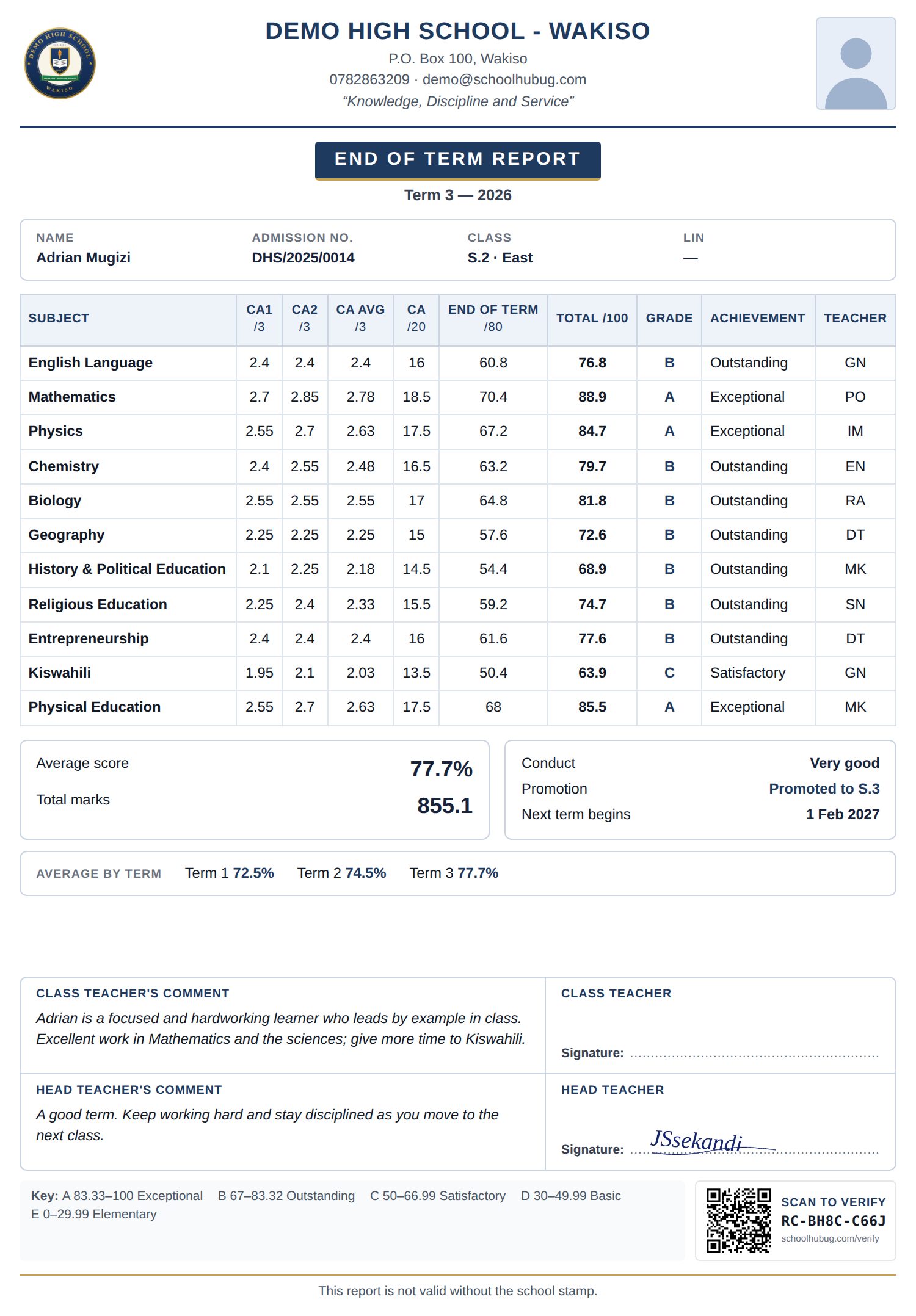
Teachers enter the marks; nobody adds, averages or grades by hand. SchoolHub works out the 20% school-based mark and the 80% exam, grades every subject and generates report cards for the whole class in seconds, like this one.

  • Activities of Integration make up the 20% school-based mark
  • Grades A-E: Exceptional, Outstanding, Satisfactory, Basic, Elementary
  • Comments, conduct, promotion and the head teacher's signature
  • A QR code on every card, so anyone can check it is genuine
An O-Level report card printed by SchoolHub: subjects, CA and End of Term marks, grades A-E with achievement, conduct, comments and the head teacher’s signature

Classic design · navy and gold · QR code to verify

A-Level

A-Level report cards with UACE grades and points, generated automatically

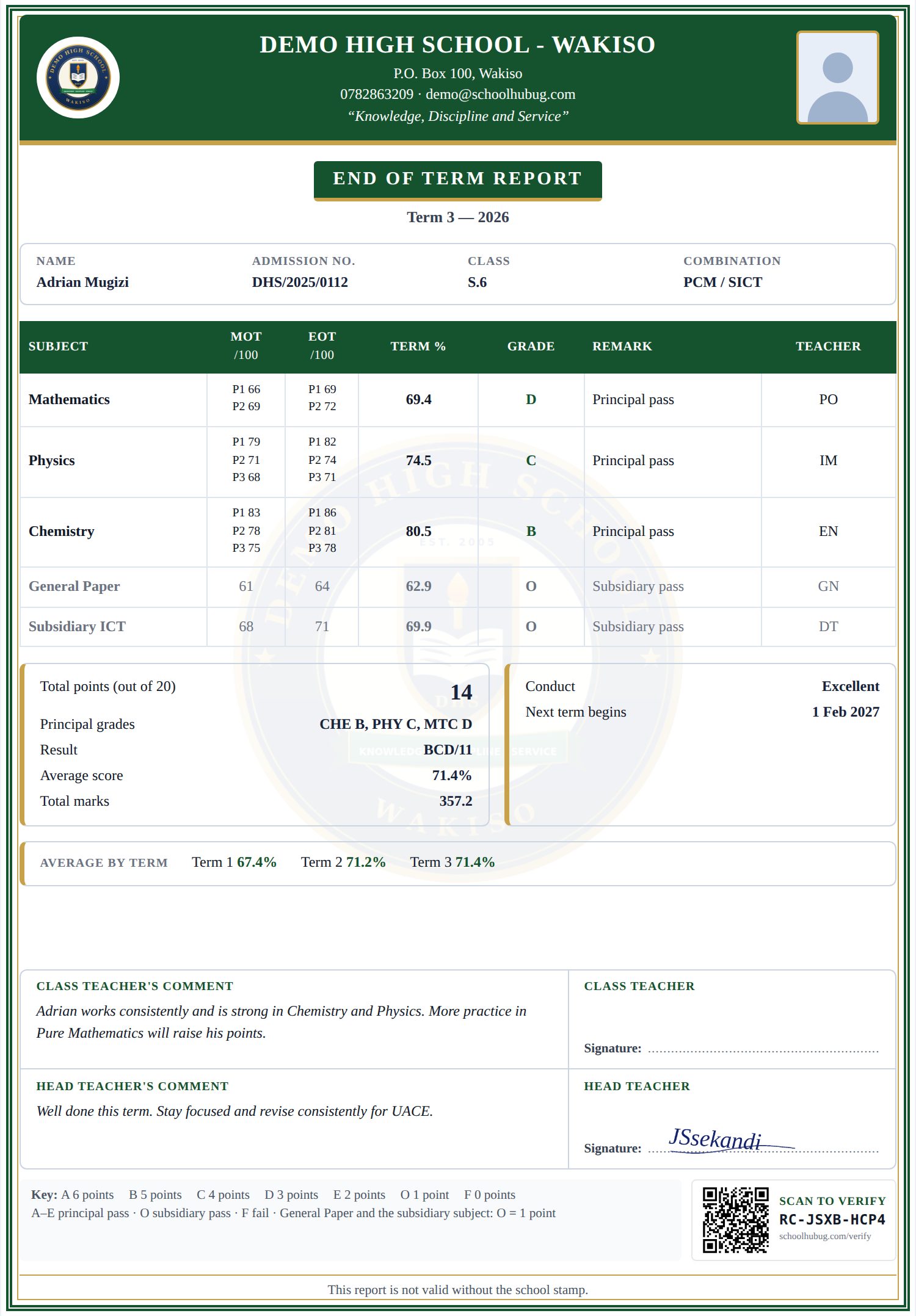
Teachers enter the marks for each paper. In seconds, SchoolHub grades every paper, works out each principal subject's grade by UNEB's rules, adds the subsidiaries and generates every learner's report card with their points out of 20.

  • Subject combinations, with General Paper and a subsidiary
  • Principal grades A-F worked out from each paper, by UNEB's rules
  • Points out of 20 and the result for every learner
  • Customised for your school: your crest, colours, layout and the parts you print
An A-Level report card printed by SchoolHub: paper marks, principal grades, points out of 20, result, comments and the head teacher’s signature

Modern design · green, gold border and faint crest · the same school, a different look

Fees

Know every balance, every day

Bill a whole class in one go, receive payments at the bursar's desk and print a receipt instantly. Balances update the moment money comes in.

  • Fee structures per class, term and residency (day or boarding)
  • Discounts and bursaries applied automatically
  • Reminder letters for parents with outstanding balances
Payroll

Pay staff correctly, on time

Run the month's payroll in minutes. Statutory deductions are calculated for you, and every staff member gets a clear payslip.

  • PAYE, NSSF (5% + 10%) and Local Service Tax
  • Allowances, deductions, advances and arrears
  • NSSF schedules ready to submit
Report cards, your way

Not a fixed format. Your school's own report card.

Most systems give you a handful of fixed report cards. In SchoolHub the school designs its own: the layout, colours, lettering, border, wording and exactly which parts are printed. Try it below.

Layout
Colours
Border
Lettering
YOUR SCHOOL NAME P.O. Box 100, Your Town · "Your school motto"
Learner's Achievement ReportTerm 3 · 2026
Name Nakato SarahClass S.2 East
SubjectScoreGradeAchievement
English Language2.6BOutstanding
Mathematics2.9AExceptional
Biology2.5BOutstanding
Geography2.1CSatisfactory
Chemistry2.8AExceptional
Head teacher's commentA hardworking learner. Keep it up.

What each school decides

  • Three layouts: Classic, Modern with a coloured band, or Compact for classes with many subjects
  • Any two colours, to match your crest and uniform
  • Four borders and plain or traditional lettering
  • Your own wording: the report's title, a note under the heading and the text at the foot
  • Your crest on every card, and as a faint watermark if you like
  • Primary, O-Level and A-Level, each graded the right way

Choose which of 20 parts to print:

Student photo LIN / combination Marks for each exam Topic levels Formative and exam parts Project work Average for each term Teacher initials Total marks Position in class Position in stream Conduct Promotion Next term begins Fees balance Class teacher's comment Head teacher's comment Signatures Grading key QR code

Set it once on the Report card design page, and every class's cards print in your school's look.

SchoolHub for Windows

No internet? Run SchoolHub on your school computer

The same SchoolHub - fees, exams and report cards, ID cards, payroll - installed on a Windows computer and working without internet. Link it to your online account and it syncs both ways whenever there is internet.

  • Works fully offline: no data bundles needed
  • Syncs with your online account when connected
  • Free for the first term, then a licence per term or per year
  • Windows 10 or 11 (64-bit) · 134 MB download

If Windows says "Windows protected your PC", click More info → Run anyway.

Pricing

Simple pricing, paid per term

Every plan includes every module. Plans differ by the number of learners, staff logins, and parent portal access. A term follows the school calendar and runs until the next term opens, holidays included.

Starter

Small schools.

UGX143,000per term
UGX386,000per year

Billed at the start of each term

Save 10% compared with paying per term

Start your free term
  • 300 active learners
  • 10 staff logins
  • All modules included

Premium

Large schools with several streams.

UGX440,000per term
UGX1,188,000per year

Billed at the start of each term

Save 10% compared with paying per term

Start your free term
  • 1,500 active learners
  • 60 staff logins
  • All modules included
  • Free parent logins: fees, receipts & report cards

Enterprise

No limits.

Custom pricing

Sized to your school - talk to us for a quote.

Contact sales
  • Unlimited active learners
  • Unlimited staff logins
  • All modules included
  • Free parent logins: fees, receipts & report cards

Every school starts free for the first term. Pay by mobile money or bank transfer when you're ready.

FAQ

Frequently asked questions

What do I need to register?

Only your school's name, whether it is a primary or secondary school, its district, and your own name, phone number and email. You can add your logo, address, motto and other details afterwards from the School Profile page.

Who becomes the administrator?

The person who registers the school becomes its School Admin, with full access. From there you can create logins for other staff and decide which modules each person can open.

What happens when the free term ends?

Choose a plan and pay by mobile money or bank transfer. If a payment is late, the school keeps working for 14 more days. After that, access pauses until payment is recorded - your data is never deleted.

Can we import our existing student lists?

Yes. Download the template, fill it in from your existing Excel register, and import all your learners in one go.

Does it work for both primary and secondary?

Yes. Primary schools get nursery and primary classes with PLE-style grading; secondary schools get O-Level (including the competency-based curriculum) and A-Level with subject combinations.

Can parents see their child's fees and report cards?

Yes, on the Premium and Enterprise plans. Parents sign in on their phone with their phone number and a PIN the school sends them, and see fee balances, receipts and the report cards the school has released. Parent logins never count towards your staff-login limit.

Book a demo

See SchoolHub working for your school

We'll walk you through fees, exams and payroll using a school like yours and answer your questions. The demo is free, takes about 30 minutes, and can be done online or at your school.

  • A live walkthrough using your own classes and fee structure
  • Help importing your learners and setting up your first term
  • Honest advice on which plan fits your school

Request a demo

Tell us a little about your school and we'll get back to you within one working day.

How should we contact you?
We only use your details to arrange your demo.

Ready to run your school the modern way?

Register in about a minute and try every module free for the first term. No payment details needed.

Chat with us